
On this page
Introduction
OS AddressBase is the premium addressing dataset provided by the Ordnance survey.
It comes in four types:
- AddressBase – This contains over 28 million Royal Mail PAF addresses
- AddressBase Core – The latest product in the AddressBase family is updated weekly as well as being the simplest to use without compromising on accuracy.
- AddressBase Plus – This contains Local Government address data linked to the Royal Mail PAF data plus additional detail and information from third party datasets
- AddressBase Premium – This contains approximately 40 million locations as well as providing historic and alternative address information, in a normalised schema
- AddressBase Premium Islands – This provides the most detailed view of an address and its lifecycle for Northern Ireland, Channel Islands and the Isle of Man, providing historic and alternative address information, in a normalised schema
For full details see the Ordnance Survey website.
The tool included in the UK Data Loader will load the data from the source files, in CSV format, into a geodatabase.
Using the tool
Load OS AddressBase Data
Locate the OS AddressBase Toolset and run the script called “Load OS AddressBase Data”.
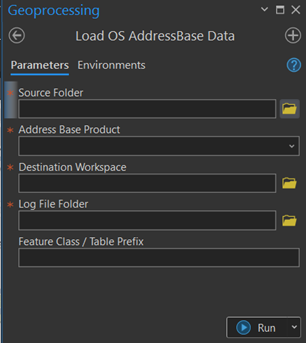
Enter the location of the source data. Select the folder which contains the csv files from the Ordnance Survey. The tool will also search sub-folders for files to process.
In some circumstances, the OS will supply the data as uncompressed csv files. This can be handled whether it is a zipped file or not. Where both zipped and unzipped files are present you will be asked to specify which you would use.
Select from the dropdown list the version of AddressBase that you want to load.
Select the existing Destination Workspace where the data is to be loaded. You can select either a file geodatabase or a database connection.
Select where to store the log file that will be created.
There is the option to designate a prefix for the feature class names.
Process COU for OS AddressBase Premium Data
Locate the OS AddressBase Toolset and run the tool called “Process COU for OS AddressBase Premium Data”.
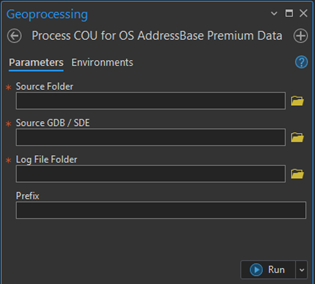
Enter the location of the source data. Select the folder which contains the csv files from the Ordnance Survey.
Select the Existing Destination Workspace where the data is to be loaded. You can select either a file geodatabase or a database connection.
Select where to store the log file that will be created.
The tool will interrogate the destination and provide a drop down of any existing AddressBase Premium datasets, select the one that the COU is to be applied to.
What does the tool do?
The tool takes csv data and converts it into Geodatabase Feature Classes in the ArcGIS Pro project’s scratch geodatabase.
AddressBase
The tool will take the csv files and load each line into the new point featureclass called ADBASE (with the prefix if specified).
AddressBase Core
The tool will take the csv files and load each line into the new point featureclass called ADCORE (with the prefix if specified).
AddressBase Plus
The tool will take the csv files and load each line into the new point featureclass called ADPLUS (with the prefix if specified).
AddressBase Premium or AddressBase Premium Islands
The csv contains two types of feature and a collection of supplementary tables.
The various record types are loaded into the following tables or featureclasses
| Record No | Record type | Destination featureclass or table |
| 11 | Street | ADPRS |
| 15 | Street Descriptor | ADPRSD |
| 21 | BLPU | ADPRB |
| 23 | Application Cross Reference | ADPRAXR |
| 24 | LPI | ADPRL |
| 28 | Delivery Point Address | ADPRD |
| 31 | Organisation | ADPRO |
| 32 | Classification | ADPRC |
Streets
Many of the street geometries that are delivered in the data have a start and end point defined as the same coordinates. This causes issues when trying to create line featureclasses from the data.
When the loader encounters street like this it will shift the end point by a small amount (1cm) to ensure they are no longer coincident and allow the feature to be created.
A list of all the streets that have been altered in this way is written out to a table called AlteredStreetUSRN for information.
How long will it take to process the data?
Below are timings for a full national load of the data into a file geodatabase
| Area | Output size | Hardware | Processing time |
| AddressBase | 5GB | Virtual Machine
4 Cores 8GB RAM |
4 hours |
| AddressBase Core | 11GB | Virtual Machine
4 Cores 16GB RAM |
6 Hours |
| AddressBase Plus | 12GB | Virtual Machine
8 Cores 32GB RAM |
12 hours |
| AddressBase Premium | 34GB | Virtual Machine
4 cores 8GB RAM |
36 hours |
| AddressBase Premium Islands | 640MB | Virtual Machine
4 Cores 16GB RAM |
40 Minutes |